Spyro 2: Gateway to Glimmer PS4 Game Controls
Spyro 2: Ripto’s Rage! / Gateway to Glimmer
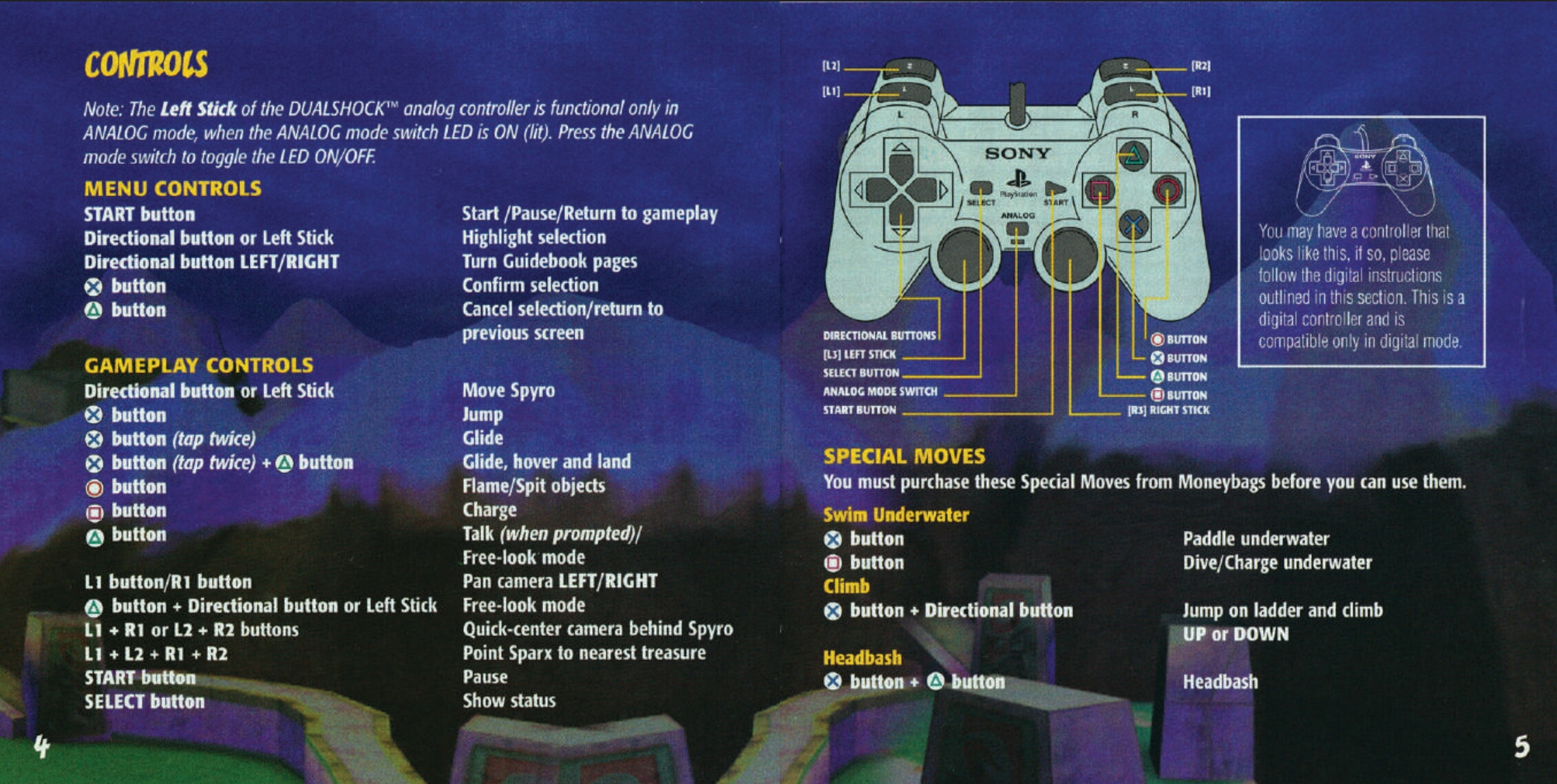
D-Pad / Left Analogue Stick — Move
Use the D-Pad or Left Analogue Stick to move Spyro around the world.
✕ — Jump
Press once to jump. Press ✕ again while airborne to glide.
✕ + △ — Hover
While gliding, press Triangle to perform a hover and land more accurately.
□ — Charge
Use Spyro’s charge attack to smash into enemies, objects and obstacles.
○ — Flame / Spit
Breathe fire on enemies and use the attack to interact with certain objects.
△ — Talk / Look Around
Press Triangle when prompted to talk to characters. Holding it allows Spyro to look around freely.
L1 — Rotate Camera Left
Moves the camera around Spyro towards the left.
R1 — Rotate Camera Right
Moves the camera around Spyro towards the right.
L2 — Rotate Camera Left
The rear shoulder button provides the same left camera control as L1.
R2 — Rotate Camera Right
The rear shoulder button provides the same right camera control as R1.
L1 + R1 — Centre Camera
Quickly moves the camera back behind Spyro.
L2 + R2 — Centre Camera
Also centres the camera behind Spyro.
L1 + L2 + R1 + R2 — Gem Finder
Hold all four shoulder buttons and Sparx will point towards the nearest gem. This is particularly useful when you’re trying to find those last few gems in a level.
START — Pause
Opens the pause menu.
SELECT — Status
Displays Spyro’s current game statistics, including gems, lives, defeated enemies and collected items.
Special Controls
Underwater — ✕ Swim / □ Dive
Once Spyro has learned to swim, use ✕ to move through the water and □ to dive deeper. Spyro can also charge underwater using □.
Ladder — D-Pad + ✕
Jump towards a ladder to grab it, then use the D-Pad or Left Analogue Stick to climb.
✕ + △ — Headbash
Once Spyro has learned Headbash, jump and press Triangle to perform the powerful downward attack. This can smash certain rocks and cages that cannot be broken using his normal attacks.